
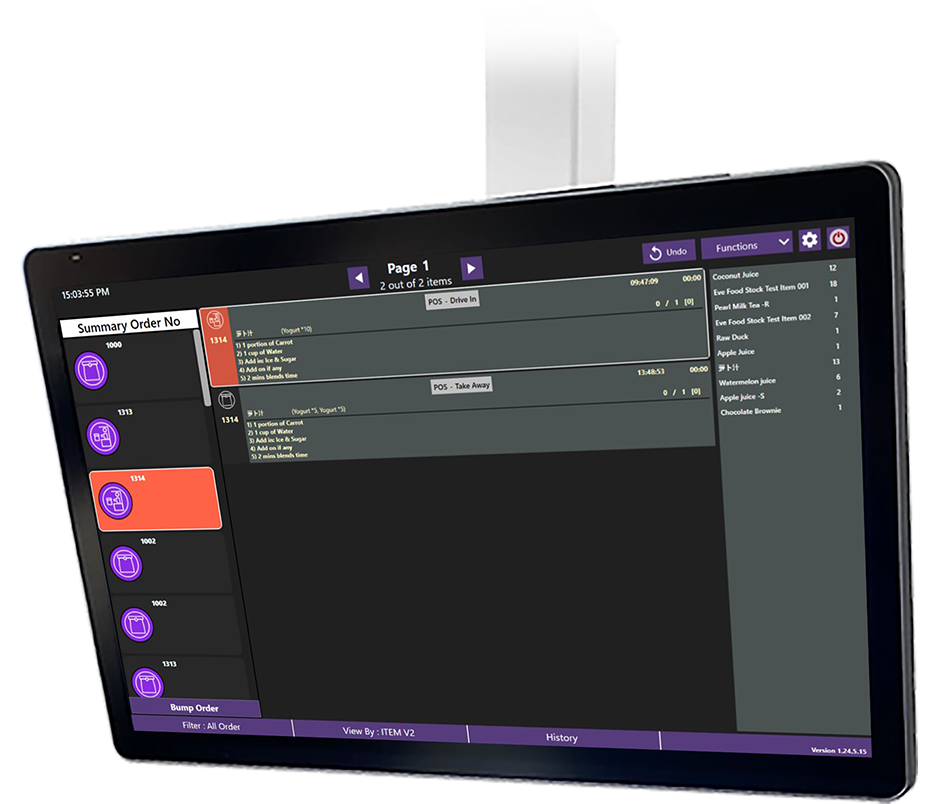
Xilnex Kitchen Display System (KDS 2.0)

Next-generation cross-platform kitchen display for modern F&B operations

Streamline Your Kitchen Workflow

Xilnex KDS 2.0 is a flexible, cross-platform kitchen display system built in Flutter for Android, iOS, Windows, and browser displays. Tailor layouts, route orders, show customer statuses, and replace paper tickets, perfect for franchise and multi-outlet F&B businesses seeking efficiency, clarity, and cost control.

Truly Cross-Platform

Flexible Layout & Profiling


Customer Display Mode
Minimal Maintenance, Rapid Deployment
Available via Multiple Channels

Understand Why it’s ROI that Compounds

Enterprise Scalability
  • Centralised control across hundreds of outlets.

  • Multi-brand support with localised menus, pricing, and promotions.

  •  

Fully Integrated Ecosystem
  • Connected to POS, inventory, CRM, KDS, and loyalty, enabling real-time updates and a closed operational loop.

  • No siloed systems. All actions flow into a single source of truth.

  •  

No App Required
  • Customers scan, browse, order, and pay, all directly from their browser.

  • Frictionless experience optimised for high-volume environments.

  •  

Brand & Menu Control at Scale
  • Roll out seasonal campaigns, combo meals, and upselling prompts across outlets instantly.

  • Role-based access allows HQ, regional, and outlet-level control.

  •  

Rich Customer Data & Engagement
  • Track customer behaviour from first scans to repeat orders.

  • Personalise promotions and loyalty rewards using built-in customer data sync.

  •  

Operational Efficiency
  • Orders routed directly to kitchen displays (KDS), reducing human error.

  • Fewer touchpoints, faster table turnover, and reduced reliance on manpower.

  •  

Built for Complex Use Cases
  • Supports dine-in, takeaway, and delivery configurations.

  • Advanced modifiers, multi-language menus, integration with TNG or SSA (Sunway Super App)

  • Seamless login among 3rd party apps

Reliable for High-Volume Environments
  • Proven in large chain restaurants, cinemas, theme parks, and malls.

  • Handles peak-time traffic with stability and real-time sync.

  •  

Deploy on Any Device, Anywhere
Don’t be locked into kiosk or proprietary hardware. Use tablets, TVs, or existing displays across back-of-house zones, great for lean operations or phased rollouts.
Lower CapEx & TCO
Skip expensive KDS appliances. KDS 2.0’s cross-platform nature slashes hardware costs and gives you the flexibility to adapt as your kitchen evolves.
Adapt to Your Workflow
Use profile-based routing, screen filtering, and exclusion rules to mirror your kitchen layout. Drinks go to the bar, food to prep, and desserts to pastries. No more confusion.
Enhance Transparency & Customer Experience
With Customer Display Mode, customers (or delivery staff) see live order statuses without extra investment. It bridges front-of-house visibility to back-of-house processes.
Scale with Confidence
Push updates, configurations, and new templates from central control. Whether you have one outlet or a hundred, maintain consistency and streamline onboarding.
Reduce Paper, Boost Accuracy
Eliminate printed tickets, reduce mis-prioritisation or lost slips, and ensure your kitchen is always working on the freshest, most relevant orders.

Play Nice with Open APIs

Seamlessly integrate with a wide range of peripherals, ensuring smooth operations across your outlet. From kitchen printers to cash drawers, the system supports the essential tools your business needs. This flexibility allows you to customise your Xilnex Classic POS for F&B setup to match your workflow, improve efficiency, and deliver a heightened customer experience.

The first omnichannel cloud-based POS system with AI insights across Southeast Asia trusted by valued brand partners.
Frequently Asked Questions

Pretty much any modern device supporting Android, iOS, Windows, or a web browser. You can use tablets, TVs, and even PC monitors, so there’s no need for dedicated KDS hardware.
Yes. You can assign profiles (e.g. food, drink) and filter so only relevant items appear on each screen. You can also exclude certain products entirely from some displays.
It’s a browser-based display that shows real-time order progress (e.g. “prepping”, “ready”). You simply point a TV or monitor to that display. No special hardware needed.
Yes. KDS 2.0 is built to integrate seamlessly within the Xilnex ecosystem, receiving orders from POS, kiosk, QR/web channels, and routing them in real-time to kitchen displays.
Not necessarily. The system is designed for low maintenance; merchants can configure layouts, routing, and updates via intuitive UI. However, our IT or operations team can always assist.

Start the conversation!

Experience the future of retail with a POS system that amplifies your growth